Cargo center of gravity in the 3D planner
Understand the weight and position assumptions behind the marker
What the marker represents
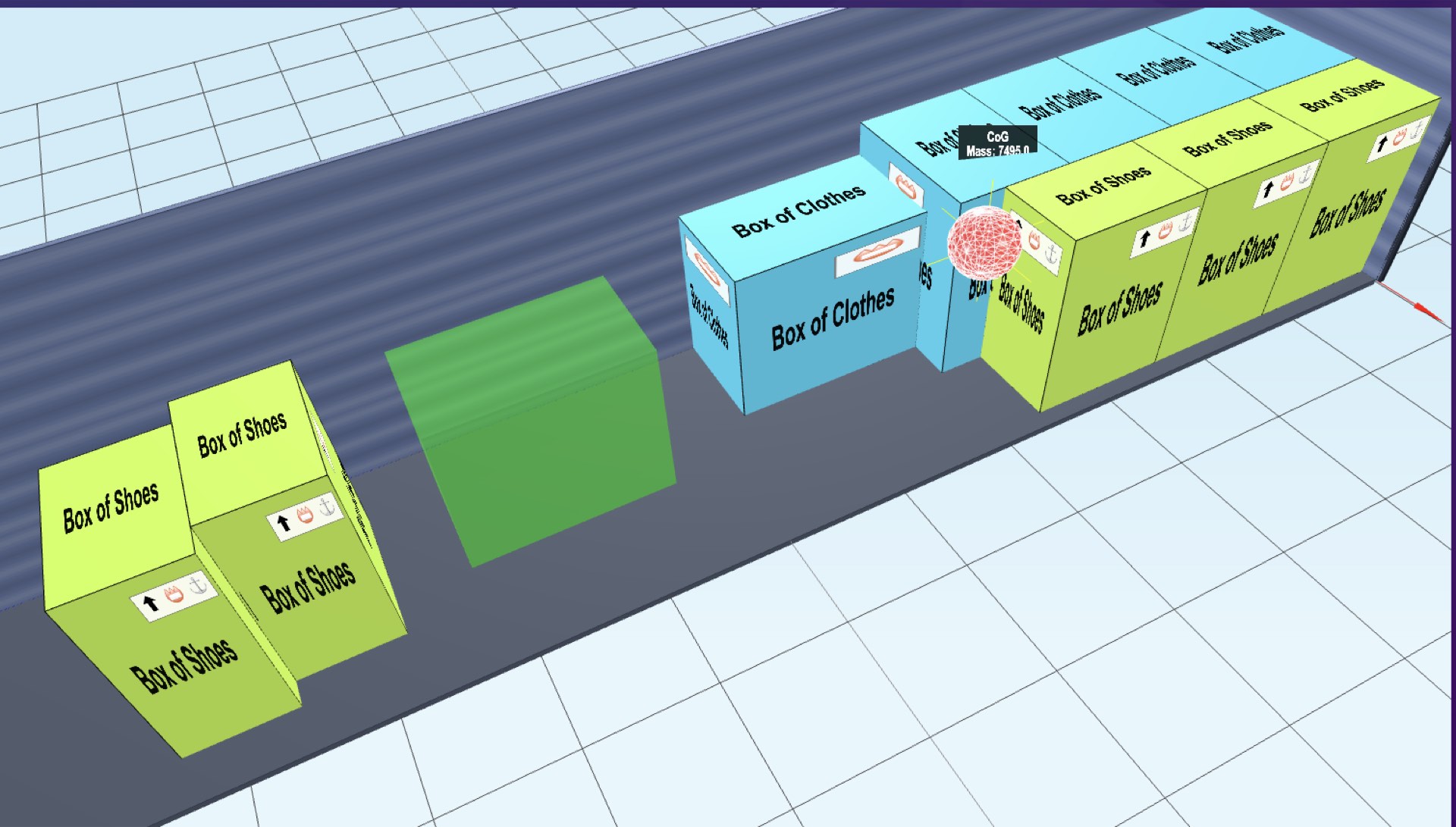
The center-of-gravity indicator shows the modeled center of mass of the packed items. It combines their positions with the item weights available in the planner. This makes the effect of moving a heavier box easier to see in a 3D layout.
The marker is a planning aid. It does not certify vehicle stability, calculate axle loads or confirm compliance with transport rules. It describes the modeled cargo rather than the combined center of mass of the cargo, container and vehicle.
How the position is calculated
Each rectangular item is represented by its geometric center, with its entered weight acting at that point. For each coordinate, the calculation adds the item weight multiplied by its center position, then divides by the total weight:
center position = sum(item weight × item center position) / sum(item weight)
For example, place the centers of a 100 kg item and a 300 kg item at 1 m and 3 m from the same reference point. Their combined position along that axis is (100 × 1 + 300 × 3) / 400 = 2.5 m. A spreadsheet can calculate the same weighted average; the 3D view helps you inspect it alongside the arrangement.
This representation assumes each item's center of mass is at the center of its box. Machinery, unevenly filled packages and other loads with an offset internal center of mass need information beyond their outer dimensions.
Enter weights before interpreting the result
Use a consistent unit and a valid weight for every item. When all item weights are absent or zero, the current display weights the item centers by their volumes instead. This is a geometric fallback that assumes equal density, not a measurement of the real cargo's mass distribution.
When some weights are available, missing or zero entries can use fallback weights, and very small entries are subject to a minimum weight. A marker can therefore appear even when the weight data is incomplete. Check the inputs and recalculate the load before treating the display as a weight-based estimate.
Review the arrangement in the viewer
Open a complete result and enable the center-of-gravity view. The indicator is recalculated when the layout is rendered and when items are moved in an editable plan. Moving an item changes the modeled position according to its weight and the distance moved.
Use this view to compare positions within the cargo model. Full custom results and their viewer controls require paid access; complete examples are available to explore free. The manual placement guide explains how to inspect and adjust a layout.
Weight distribution on a trailer
A cargo center-of-mass coordinate has to be interpreted using the actual vehicle and its loading limits. The CTU Code, annex 7, section 3.1.7 describes vehicle-specific load-distribution diagrams relating permitted cargo mass to its longitudinal position. Use the diagram and limits for the equipment you will load.
The truck load calculator provides editable space estimates and vehicle dimensions. Its carton-fit estimate does not check axle loads. For palletised cargo, the pallets per container guide explains standard footprints and floor-count examples; those counts also need the handling and weight checks for the actual shipment.
Keep the rest of the loading assessment separate
The center marker does not assess friction, lashings, floor strength, carton compression, suspension behavior or forces during transport. Refer to the IMO/ILO/UNECE CTU Code for guidance on packing and securing cargo, including the calculations and equipment information those tasks require.
Its annex 7, appendix 4 gives the longitudinal weighted-average calculation and explains that it must be used with the appropriate load-distribution rules and diagrams. The display helps you examine a model; the shipment still requires the relevant operational checks.
Inspect your cargo layout
Enter the dimensions and weights of your items, then review their arrangement in the 3D planner. Full custom results unlock with a $9 pack or subscription.
Open the 3D planner