Road freight
Truck load calculator
See what fits in your truck and how its weight is distributed. Compare trailer dimensions, plan mixed cargo in 3D, and estimate axle loads using your vehicle measurements. Move cargo by hand and watch the axle readings update.
Complete basic estimates are free. Preview mixed loads in 3D; full custom plans unlock with a $9 pack.
Free carton fit calculator
One carton size, one empty rectangular space. Enter the inside dimensions and get a calculated carton count, layer drawing and volume use immediately.
Complete basic results. No account or card needed.
Estimated cartons in one space
136 cartons per layer × 6 layers = 816 cartons
Space estimate: payload has not been checked. Add your available cargo allowance to apply a weight limit.
- Cartons per complete layer
- 136
- Layers used
- 6
- Volume use
- 85.9%
- Carton volume
- 78.336 m³
- Cargo weight
- 8160 kg
- Loaded height
- 240 cm
The original carton height is vertical (40 cm). Amber cartons turn 90° on the floor. Higher layers repeat this orientation and pattern; a payload-limited final layer can be incomplete.
Loads for your order — feasible geometric estimate
1
Loading spaces needed for 100 cartons: 1. The drawing and cargo measurements above show one space at capacity, not the whole order.
Volume/payload lower bound: 1. This is only a necessary bound; it is not a demonstrated packing plan or a promise of the minimum number of loads.
13.6 m trailer. These are editable nominal planning dimensions, not a verified specification for every trailer of this length. Measure the actual usable interior.
Compare the same cartons in another space
Each row uses the carton size, orientation, order and payload allowance entered above. Only internal dimensions change. Confirm the allowance separately for each equipment type.
| Loading space | Cartons per load | Volume use | Loads for order |
|---|---|---|---|
| 13.6 m trailer | 816 | 85.9% | 1 |
| 53 ft trailer | 960 | 82.91% | 1 |
How the carton estimate works
- Find a layer that fits. Compare both horizontal rotations and mixed layouts with a single dividing line. With all orientations allowed, repeat this check for each choice of vertical carton dimension.
- Repeat the layer within the height. Divide internal height by carton height in the selected orientation and round down. The method keeps one vertical orientation and repeats the same layer; it does not prove the best possible 3D packing.
- Apply payload and count the loads. If a payload is entered, divide it by carton weight and round down. Use the smaller of the space count and weight count. Divide the order by this capacity and round up for a repeatable geometric estimate.
What the estimate leaves to check
This is one rectangular carton size in an empty rectangular interior. It does not check door entry, wheel arches, packing gaps, pallets, carton crush strength, stacking stability, load restraint, unloading order or axle loads. Interior fit alone does not establish a practical loading plan. Check the actual shipment and equipment before loading.
Read the loading-order guideDifferent cartons or handling rules?
The separate 3D planner handles mixed loads and additional constraints. Explore examples and preview your own load free; full custom 3D results start with a $9 pack.
The short answer
33 euro pallets on the floor of a 13.6 m curtainsider. 26 GMA pallets in a 53 ft dry van.
Single tier, no overhang, weight permitting.
These are common single-tier loading patterns, not weight ratings. For the 33-pallet euro layout, eleven rows of three 120 × 80 cm pallets use 13.2 m of length and 2.4 m of width. Other orientations can change the floor count. Check the actual trailer interior, cargo overhang, loaded height, payload and axle limits before treating any floor layout as a loadable shipment.
Truck axle load calculator: see the weight distribution in 3D
See cargo-added loads beside the steer, drive and trailer groups. Drag a crate forward or back to compare an arrangement immediately, without running another packing calculation. Rigid trucks show front and rear groups.
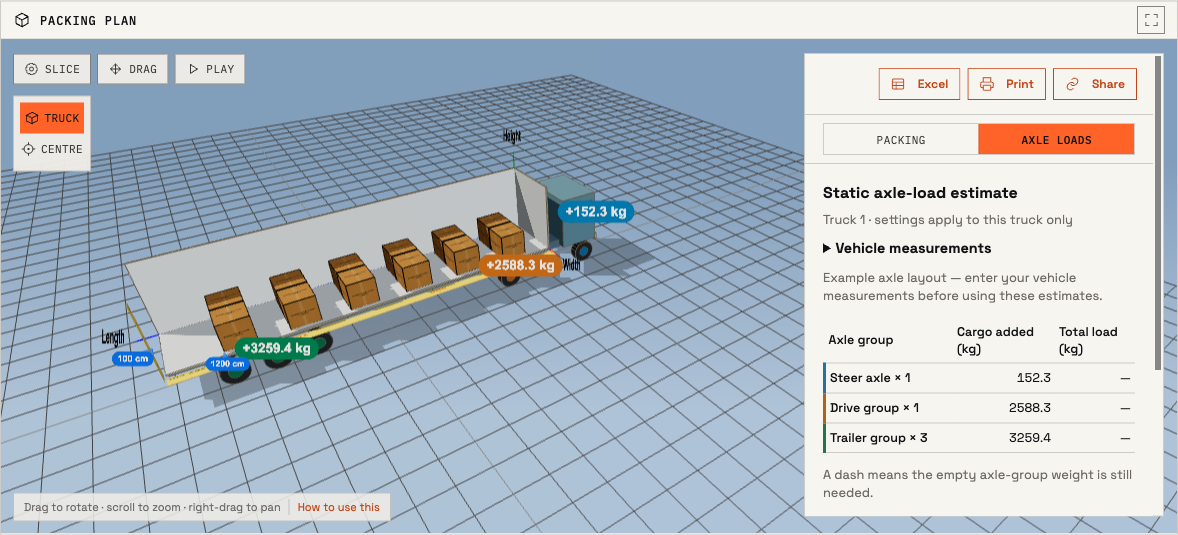
Use your vehicle measurements
- Choose Truck under Pack into, select a body preset and enter the cargo dimensions, quantities and weights. Open the resulting 3D plan.
- In the result panel, select Axle loads → Vehicle measurements. Choose a rigid truck or tractor with semi-trailer, then enter the axle-group positions, axle counts and spacing. For a semi-trailer, enter the kingpin position too. Distances are measured from the cargo front wall; positions ahead of it are negative.
- Enter the empty axle-group weights for your vehicle, coupled for a tractor and trailer, to see total loads. You can also enter group limits for comparison. Apply the measurements, enable Drag on the canvas and move cargo to explore the effect.
Cargo added versus total axle load
The coloured canvas labels show the change caused by the cargo on each axle group. The table adds the empty group weight when you supply it: total axle-group load = empty group weight + cargo-added load. A multi-axle group value is the sum for that group, not the load on each individual axle.
A negative cargo-added value means that the cargo unloads that axle group. For example, cargo centred ahead of a semi-trailer’s kingpin can reduce the trailer-group reaction while increasing the load transferred to the tractor. It does not mean the vehicle has a negative total weight.
How the estimate works
The calculator uses each placed item’s weight and centre position to find the cargo centre of gravity, then balances vertical forces and moments across the axle groups. For a semi-trailer, it first splits the cargo reaction between the kingpin and trailer group, then distributes the kingpin reaction across the tractor groups.
Starting axle layouts are examples, not vehicle specifications. These are static estimates for level ground with centred item masses and equal sharing within each group. The tool does not automatically optimise axle distribution, model braking or suspension behaviour, or certify road compliance. Use your actual measurements and verify the loaded vehicle on scales.
Trailer and van dimensions
Internal measurements for the vehicles that carry most palletised freight, with the euro or GMA pallet count each takes on a single tier.
| Vehicle | Internal L × W × H | Pallets, one tier | Typical payload |
|---|---|---|---|
| EU semi-trailer (curtainsider) | 13.62 × 2.48 × 2.70 m | 33 euro / 26 industrial | ~24,000 kg |
| EU mega trailer | 13.62 × 2.48 × 3.00 m | 33 euro | ~24,000 kg |
| EU rigid, 7.5 t | 6.20 × 2.45 × 2.40 m | 15 euro | ~3,000 kg |
| Box van, 3.5 t | 4.00 × 2.00 × 2.20 m | 8 euro | ~1,000 kg |
| US 53 ft dry van | 16.00 × 2.49 × 2.79 m | 26 GMA (30 turned) | ~20,000 kg |
| US 48 ft dry van | 14.55 × 2.49 × 2.79 m | 24 GMA | ~20,000 kg |
| US 28 ft pup | 8.50 × 2.49 × 2.79 m | 14 GMA | ~10,000 kg |
Nominal figures. Trailer interiors vary by manufacturer and by body type, payload varies with the tractor unit and the local weight limit, and pallet counts assume no overhang. Measure the vehicle you actually have before committing to a number.
Pack your own load
Enter the trailer and the cargo — or describe the shipment in a sentence — and the solver places every item, respecting stacking limits, weight caps and items that cannot be tipped.
The full planner handles mixed sizes and additional handling rules. Explore complete examples and preview your cargo free; full custom 3D plans unlock with a $9 pack.
What changes the answer
Four things decide whether the floor count survives contact with the load. Every one of them is why a published figure and a real trailer disagree.
- Axle limits, not just total weight
- A load can fit inside a truck and still put too much weight on an axle group. In a truck result, open Axle loads and enter the vehicle measurements to estimate the distribution. Moving cargo updates the readings; the packing solver does not automatically balance axle loads.
- Usable height, not internal height
- The internal figure is measured to the roof. Curtain sliders, roof bows and the deck of a mega trailer all take some of it, and a pallet that clears on paper by two centimetres does not clear in practice.
- Overhang
- Cargo that extends past the pallet edge changes the footprint the trailer sees. A few centimetres per pallet is what turns 33 into 30, and it is the single most common reason a published count does not survive contact with real cargo.
- What may sit on what
- Double-stacking doubles a count only if the lower tier can carry the upper one and the total clears the roof. Fragile, non-tiltable and crush-limited items break that arithmetic, and they are the norm rather than the exception.
Questions
How many euro pallets fit on a standard trailer?
33 on a single tier of a 13.62 m curtainsider, loaded eleven rows of three. A mega trailer has the same floor and more height, so it takes the same 33 unless you can double-stack.
How many pallets fit in a 53 ft trailer?
26 GMA pallets (48 × 40 in) loaded straight, two across and thirteen deep. Turn every pallet so its 48 in side runs across — two fit inside the 98.5 in body — and fifteen rows of 40 in give 30.
Why does my load not fit when the arithmetic says it should?
A floor count does not check every loading constraint. Cargo overhang changes the footprint; loaded height must clear the doors and roof; payload and axle limits can bind before the trailer is full. Stacking strength, restraint and unloading access can also rule out a layout that fits geometrically.
Does this handle mixed cargo and part loads?
Yes. Enter several item types with their own quantities, weights and stacking rules, and the solver arranges them together rather than treating the load as one uniform block.
Can I calculate truck axle loads and change the load distribution?
Yes. Select Truck in the planner, open a result, and choose Axle loads. Enter the axle positions and, for a semi-trailer, the kingpin position. Add empty axle-group weights to see total loads. The 3D labels show the cargo-added load on each group and update when you drag cargo. Repositioning is manual; the solver does not automatically rebalance the axles.
Are the truck axle presets accurate for my vehicle?
The starting axle layouts are editable examples, not manufacturer specifications. Replace them with measurements for your vehicle. Estimates assume a stationary vehicle on level ground, centred item masses and equal sharing within axle groups. They do not certify road compliance or replace weighing the loaded vehicle.